



If you own recognition inside HR, you already know the harder question. You are trying to stand up something durable, or rescue one that lives on a spreadsheet, an HRIS export, and a set of calendar reminders. Catalogs answer what to give. They do not answer how to run it.
This guide is going to walk you through the build of an effective employee service awards program. We’ve worked with hundreds of companies helping them create impactful programs and these are our lessons distilled into five actionable steps.
For each step, we’ll explain how we typically see teams manually execute this process, then we’ll show how our product WorkProud the version that ships pre-assembled inside WorkProud. One note on scope: recognition satisfaction typically drops off after the five-year mark, when tenured employees stop feeling seen by the same template that welcomed them at year one. That is a separate design problem covered in our employee milestone recognition article. Here, the focus is the operating system underneath the program.
Every later decision hangs on tiering. Reward budget, message templates, visibility, approval routing, reporting cadence. If you skip this step, you end up with the same automated points deposit landing on someone’s first anniversary and someone’s twenty-fifth. That is the outcome a tenured employee is most likely to describe as insulting.
Sit down with your compensation lead and pick the years you want to formally celebrate. Most programs land on some subset of 1, 3, 5, 10, 15, 20, 25, and 30 years. Then, for each tier, write down four things:
That table becomes your program spec. Everything else references back to it.
In WorkProud, tiers are configured directly on the platform. Each tier gets its own Custom Post Type: a distinct banner design, a message prompt set for the recipient’s peers and manager, a defined award value tied to a rewards catalog, and visibility rules that control whether the celebration lands in a team feed or the company-wide feed. A one-year welcome can look and feel different from a fully custom fifteen, twenty, or twenty-five-year experience. You configure your specifications once then WorkProud continues to enforce them.
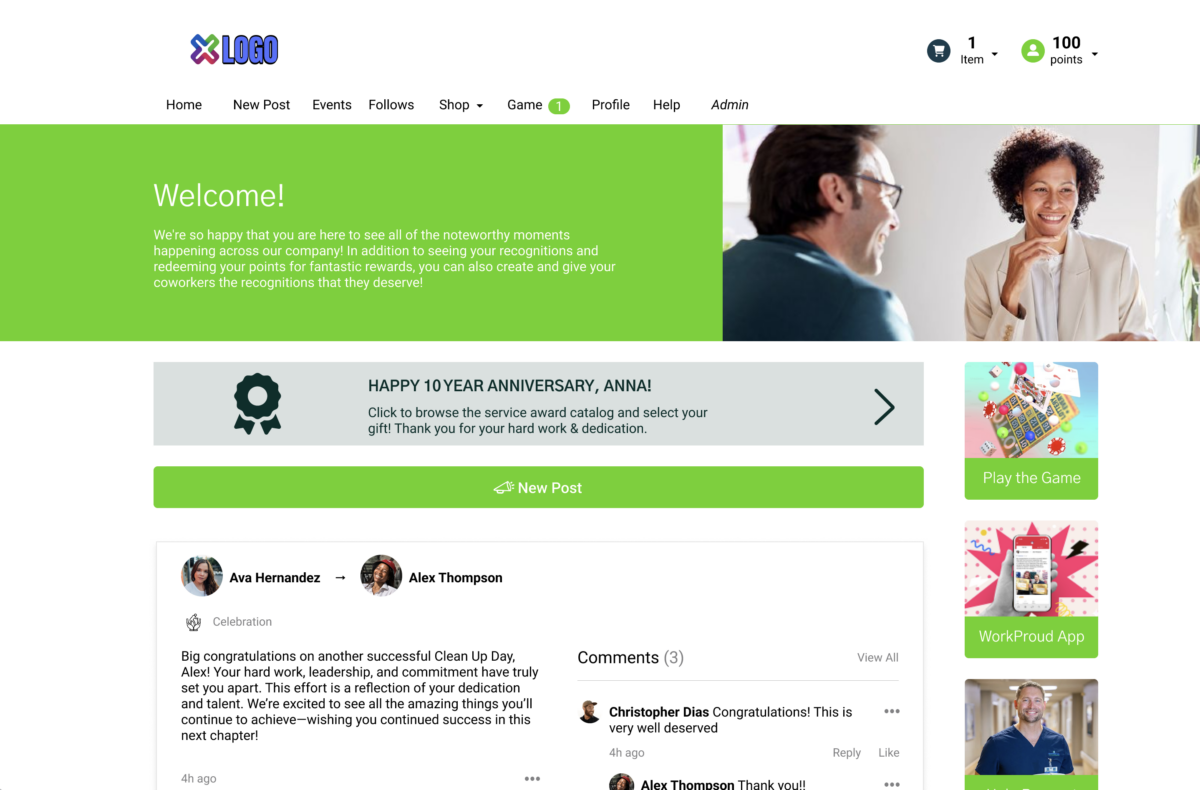
This is where spreadsheet programs don’t fully get the job done. It’s easier to nail this in year one, when everyone is paying attention. Then in year eleven, when the person who used to run the manual milestone list left in Q2 and no one was there to catch it.
Repeat.
We find that mishaps aren’t usually due to the workflow itself. Rather, it’s the workflow when you are hiring, running open enrollment, and covering a leave at the same time. This is usually when missed dates happen. Resulting in a letter going out with the wrong tenure or the wrong name.
WorkProud’s Milestone Automation fires off HRIS data. Anniversaries and role changes trigger automatically. The branded post generates on the correct date, formatted for the correct tier, with prompts pre-populated so the manager and peers can add their own messages without starting from a blank field. If someone moves teams or changes roles, the system reflects it. No sheet to maintain which leads to no missed reminders.
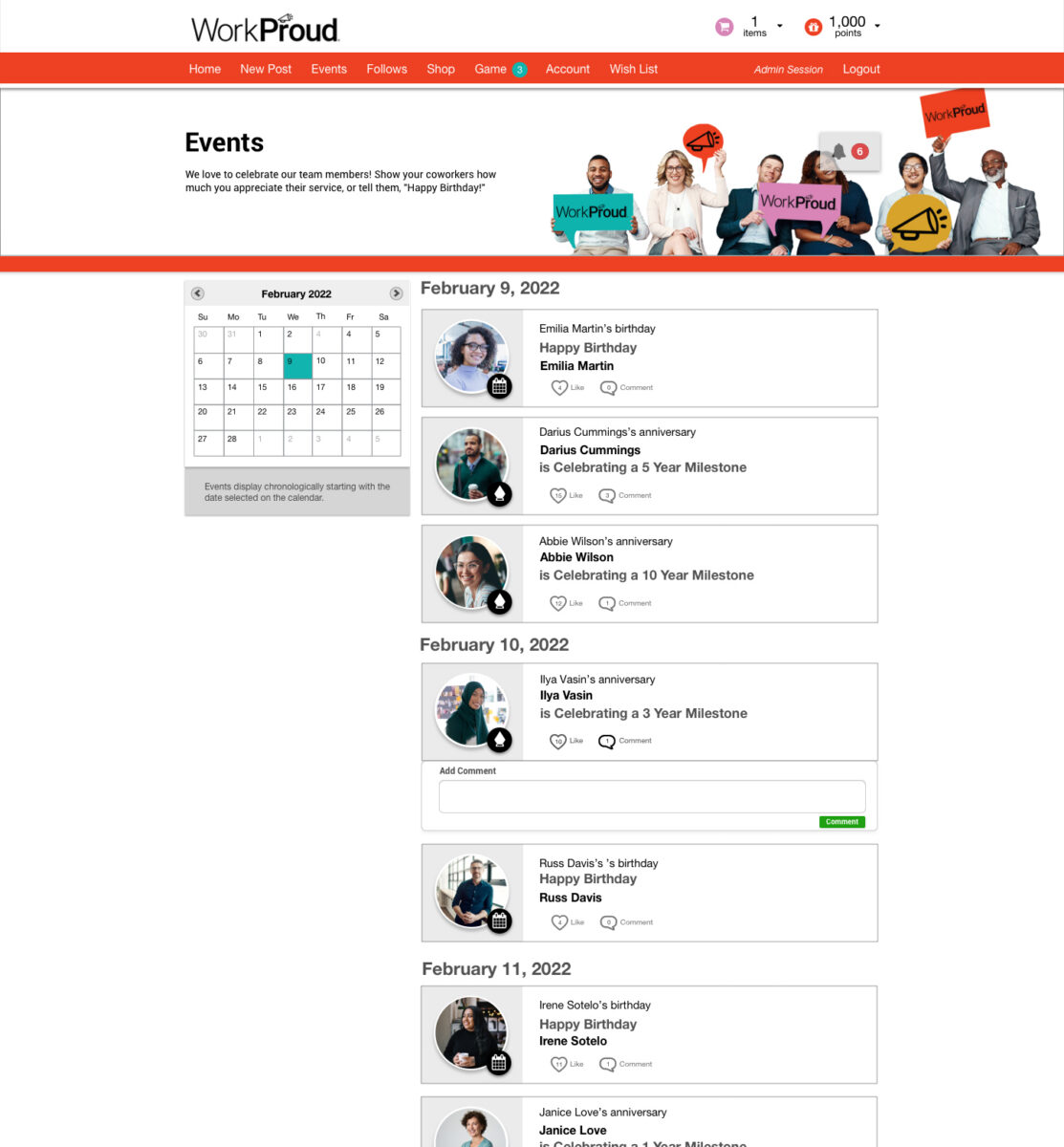
This is the ask HR program owners keep raising in evaluation calls: “If it could all be in one place and integrated with either Teams or Workday, that is on my ask list.” That is the point of Step 2. For a deeper look at the automation logic and HRIS handoff, see our write-up on milestone automation inside a unified platform.
Ask any tenured employee about a scheduled reward and you’ll hear some version of this: points that arrive automatically feel about as meaningful as the yearbook photo you never look at. The problem is not our automation. It’s that the automation is ending at the delivery instead of having social buzz around the moment itself.
If you want the milestone to feel like a story, you build it manually. Reach out to three peers a week ahead. Ask them for a memory. Copy their notes into a card. Get the manager to add a paragraph. Loop in a leader if the tier warrants it. Print, ship, or read aloud.
This works. It also does not scale past a few dozen milestones a year without becoming a full-time job.
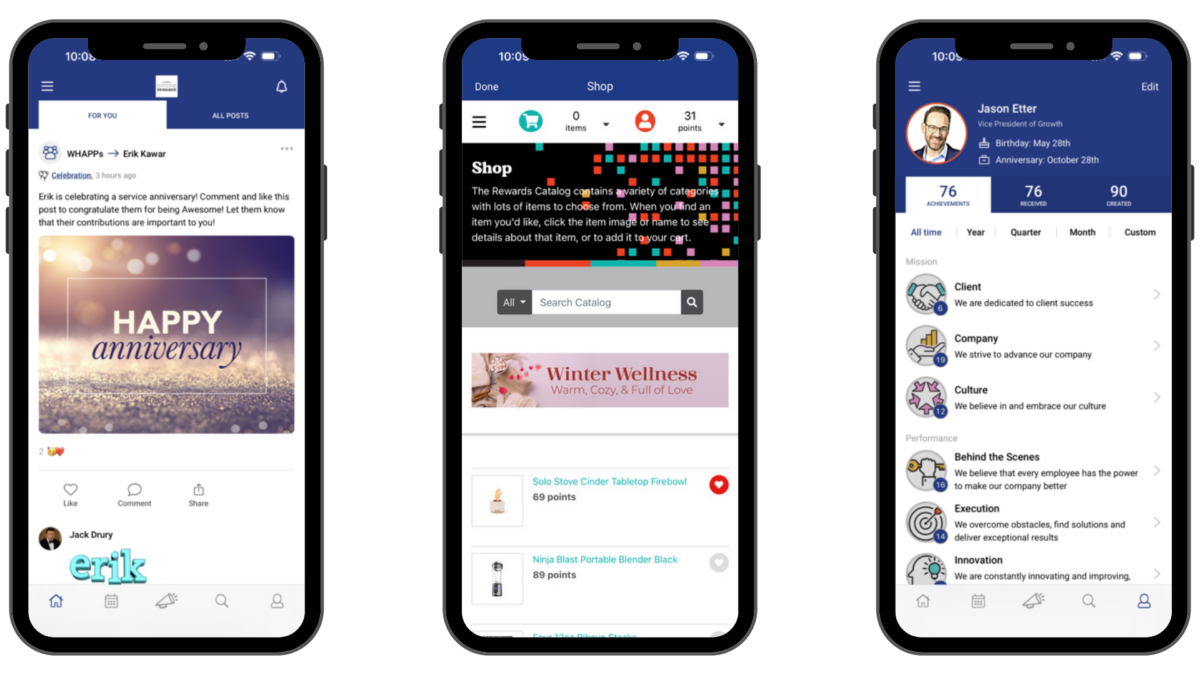
In WorkProud, the milestones are as posts in the Recognition Feed. Peers can react and comment directly on the post, adding their own stories tied to a company value. The manager adds a personalized note through the prompt built into the tier’s Custom Post Type. Leadership can weigh in when the tier warrants it. Comments and reactions accumulate on the post itself, so the moment stays visible and the record persists.
So employees don’t just receive awards but they receive a stream of specific memories from the people they work with, tagged to what they contributed. And it’s these type of actions that turn milestones into actual stories.
The single most common complaint from HR program owners: “Everything is required by our ET. Our internal nomination tool requires a lot of approvals.” Approval friction is what kills program velocity. It also produces the delayed recognition that tenured employees remember as “the plaque that arrived four months late.”
Write a policy. Define what the standard award is at each tier. Define an exception threshold above which a case needs sign-off. Route exceptions to a named approver with a target turnaround. Track the queue in a shared inbox or a ticketing tool. Escalate when things sit.
This is fine on paper. In practice, standard awards get pulled into the same queue as exceptions because everything routes through one inbox.
Tier-based thresholds are configured directly in the platform. Standard milestones inside the rules fire automatically at the pre-set value, with no approval required. Only true exceptions, cases outside the defined threshold or requiring a discretionary top-up, route to the assigned approver. The queue only contains the things that actually need a human decision. The rest ship on time, on tier, on brand.
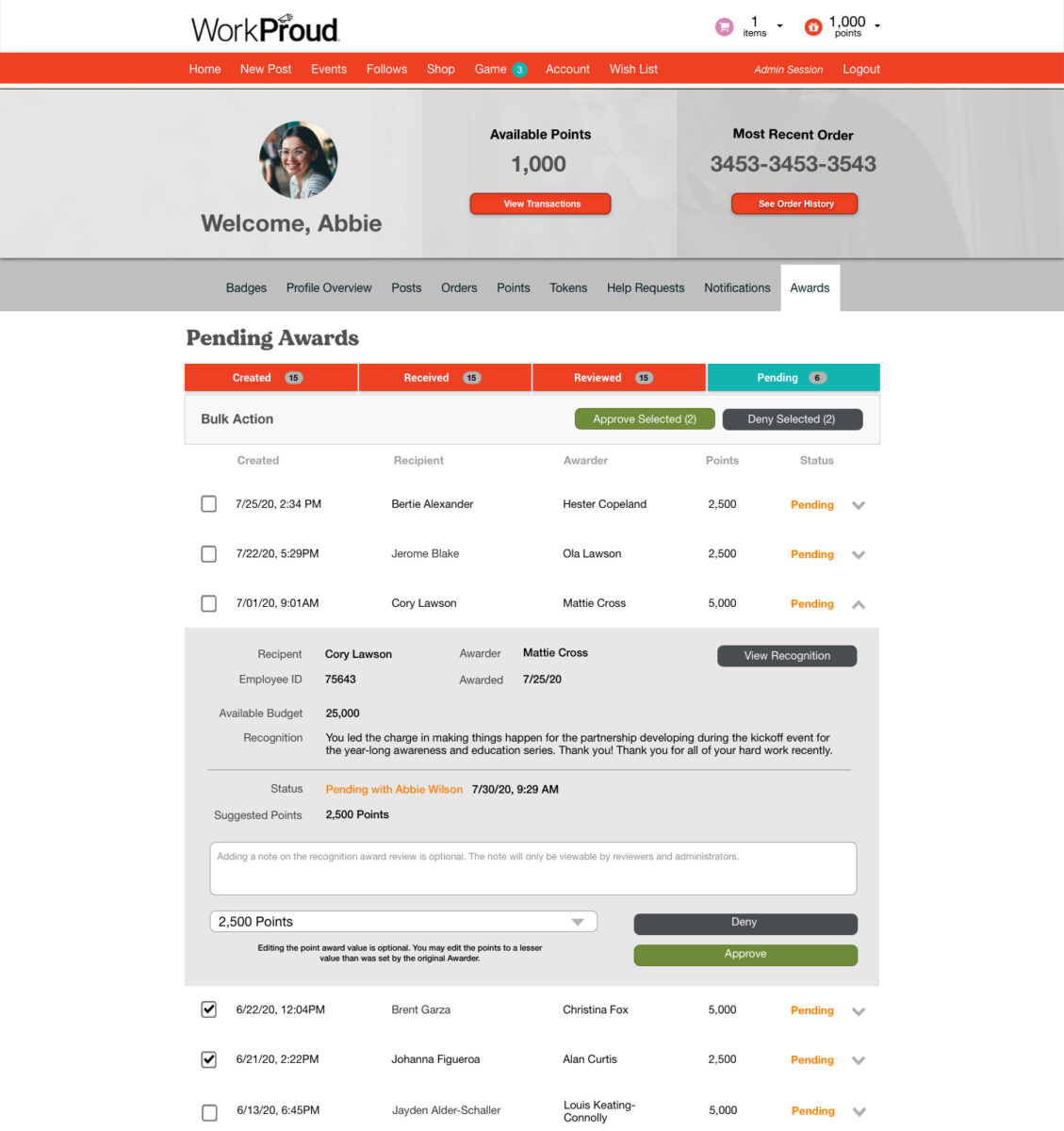
The result is the outcome an HR program owner is trying to protect: standard awards run. Exceptions get attention. You stop being the bottleneck on your own program.
The last step is aligning reward value to tenure and giving yourself the reporting that answers the CHRO question before it gets asked.
Set reward values per tier, with clear separation from spot bonus values. A ten-year award shouldn’t be read the same as a Friday-afternoon shout-out. Then, every quarter, pull the data by hand: how many one-year, five-year, ten-year, twenty-year anniversaries happened, how many were completed on time, how much you spent per tier, and what peer engagement looked like on each post.
Building that report from spreadsheet exports is a full afternoon per quarter at minimum.

Rewards are tiered inside WorkProud’s catalog with distinct values, categories, and, where useful, company-supplied options like PTO days or payroll credits. Reporting rolls up in the quarterly view: milestones celebrated by tier, completion rate against expected count, spend against budget, and peer engagement per post measured by comments and reactions. When the CHRO asks how the service awards program performed last quarter, an ent
For the broader analytics layer this dashboard sits on top of, see the HR capabilities and platform overview.
If you are building a spec, benchmarking a current program, or writing an RFP, this is the checklist. Every one of these has to exist, and every one of them has to talk to the others.
If any of the six is missing, the program leaks. Usually at the seam between the missing piece and the one next to it.
Every step above ships pre-assembled in WorkProud. Tiers, HRIS-triggered posts, the social feed, budget rules, tiered rewards, and quarterly reporting are one program on one platform, not six vendors stitched together. Typical launch runs: honest typical launch timeline for out-of-the-box service awards deployment] rather than the multi-quarter builds that enterprise buyers have been trained to expect.
The proof this holds up in practice sits in two client outcomes:
Gallup’s data reinforces the direction: well-recognized employees were 45% less likely to have turned over two years later.
You just built the full program on paper. If you want to see what the same build looks like already configured, running against your HRIS, and generating tier-appropriate milestone moments on the correct dates, request a milestone-focused demo. It is a working session, not a pitch deck. Bring your current tier structure or the sketch of one, and we will show you the same five steps live.
For the broader case where recognition programs quietly break, our 10 signs your recognition program is outdated piece is a useful diagnostic before the call.
An icon of style from Hollywood to hip-hop, the Wayfarer never stands still. Forever embraced by the next generation of culture makers, now its journey continues with AI-enhanced wearable tech. Ray-Ban Meta Wayfarer enables you to live in the moment and share how you see the world. Listen, call, capture and livestream features are seamlessly integrated within the classic frame. Eye size: 50; Frame: Matte Black; Lens: Clear/Graphite Green Transitions; Lens Material: Standard Plastic
Color: Matte Black/Clear-Graphite Green Transitions
A
Afghanistan
Albania
Algeria
Andorra
Angola
Antigua & Deps
Argentina
Armenia
Australia
Austria
Azerbaijan
B
Bahamas
Bahrain
Bangladesh
Barbados
Belarus
Belgium
Belize
Benin
Bhutan
Bolivia
Bosnia Herzegovina
Botswana
Brazil
Brunei
Bulgaria
Burkina
Burundi
C
Cambodia
Cameroon
Canada
Cape Verde
Central African Rep
Chad
Chile
China
Colombia
Comoros
Congo
Congo {Democratic Rep}
Costa Rica
Croatia
Cuba
Cyprus
Czech Republic
Denmark
D
Djibouti
Dominica
Dominican Republic
E
East Timor
Ecuador
Egypt
El Salvador
Equatorial Guinea
Eritrea
Estonia
Ethiopia
F
Fiji
Finland
France
G
Gabon
Gambia
Georgia
Germany
Ghana
Greece
Grenada
Guatemala
Guinea
Guinea-Bissau
Guyana
H
Haiti
Honduras
Hungary
I
Iceland
India
Indonesia
Iran
Iraq
Ireland {Republic}
Israel
Italy
Ivory Coast
J
Jamaica
Japan
Jordan
K
Kazakhstan
Kenya
Kiribati
Korea North
Korea South
Kosovo
Kuwait
Kyrgyzstan
L
Laos
Latvia
Lebanon
Lesotho
Liberia
Libya
Liechtenstein
Lithuania
Luxembourg
M
Macedonia
Madagascar
Malawi
Malaysia
Maldives
Mali
Malta
Marshall Islands
Mauritania
Mauritius
Mexico
Micronesia
Moldova
Monaco
Mongolia
Montenegro
Morocco
Mozambique
Myanmar
M
Namibia
Nauru
Nepal
Netherlands
New Zealand
Nicaragua
Niger
Nigeria
Norway
O
Oman
P
Pakistan
Palau
Panama
Papua New Guinea
Paraguay
Peru
Philippines
Poland
Portugal
Q
Qatar
R
Romania
Russian Federation
Rwanda
S
St Kitts & Nevis
St Lucia
Saint Vincent & the Grenadines
Samoa
San Marino
Sao Tome & Principe
Saudi Arabia
Senegal
Serbia
Seychelles
Sierra Leone
Singapore
Slovakia
Slovenia
Solomon Islands
Somalia
South Africa
South Sudan
Spain
Sri Lanka
Sudan
Suriname
Swaziland
Sweden
Switzerland
Syria
T
Taiwan
Tajikistan
Tanzania
Thailand
Togo
Tonga
Trinidad & Tobago
Tunisia
Turkey
Turkmenistan
Tuvalu
U
Uganda
Ukraine
United Arab Emirates
United Kingdom
Uruguay
Uzbekistan
V
Vanuatu
Vatican City
Venezuela
Vietnam
Y
Yemen
Z
Zambia
Zimbabwe
Here you will find insights curated for leadership seeking in-depth industry knowledge. Explore comprehensive studies, helpful guides, and expert white papers.
*By selecting “VIEW RESOURCES,” you agree to WorkProud’s Privacy Policy. You may unsubscribe from our emails at any time. Please note when unsubscribing: it may take up to 10 business days for your request to take effect.